
Setting up PCBoard under Windows NT Server or Workstation may seem complicated at first, but after reading this document the majority of your questions about setting it up should be answered.
Windows Settings
	Add the following to your SYSTEM.INI file.

                Under [386enh]

                  UniqueDOSPSP=1

                Under [NonWindowsApp]

                  CommandEnvSize=768

	The APPS.INF (\WINNT\INF\) is used for automatically
	configuring MS-DOS application Program Information Files
	(PIFs).  Edit this file and add the following header and
	information.

		[PCBOARDM.EXE]
		Disable=win,dit,mse

		[PCBOARD.EXE]
		Disable=win,dit,mse

		[NODEx.BAT]
		LowMem=768
		Disable=win,dit,mse

		[BOARD.BAT]
		LowMem=768
		Disable=win,dit,mse
Communications under NTUsing Async COMM ports Under WIN NT With PCBoard
PCBoard directly accesses the serial port hardware when setup in Async mode. Windows NT supports PCBOARD by simulating the standard hardware serial adapters, COM1 through COM4; PCBoard never directly controls the serial port hardware.Windows NT simulates four 16450 UARTs at the standard serial I/O addresses and interrupt numbers used in IBM PC-compatible hardware. When each virtual MS-DOS machine (VDM) starts, the simulated UARTs are dormant. When PCBoard accesses a simulated UART, Windows NT connects the simulated UART to the corresponding Windows NT serial port, even if it uses a different address, interrupt number, or a completely different interface. If the corresponding serial port is not present of if it is already in use, Windows NT displays an error dialog box to inform the user of the problem.
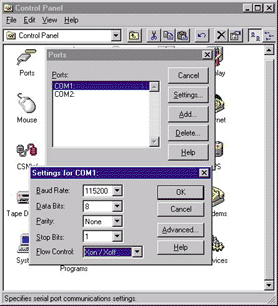
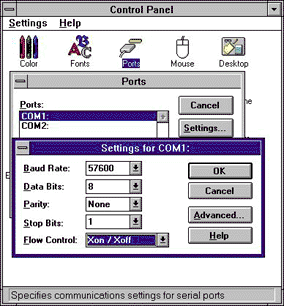
When running PCBOARD under WIN NT, you may enhance performance by using software handshaking (xon/xoff) instead of hardware handshaking (cts/rts).
| NT 4.0 | NT 3.51 |
| 
|
Because hardware must be virtualized under NT, checking the cts/rts signals directly will incur an unavoidable performance degradation. Using xon/xoff handshaking avoids this problem since xon/xoff handshaking does not require accessing the serial port hardware directly.
| NOTE: Serial communications is not emulated perfectly because of fundamental differences between the preemptive and nonpreemtive multitasking environments. PCBoard uses real-time hardware interrupts, it may experience problems caused by preemptive multitasking in Windows NT. Timing serial events in Windows NT may be different than in 16-bit Windows 3.1. Also, the ability to directly access hardware is not available in Windows NT. Additionally, due to the way that the ports are simulated under Windows NT, you are NOT going to be able to use DOS DOORS while running PCBoard in ASYNC mode. The only current way to work around this is to use a FOSSIL interface that is designed to work in the NT environment. |
WINFOSSIL
WinFOSSIL is a 32-bit FOSSIL driver which enhances the performance
of existing MS-DOS communication applications such as many bulletin
board programs and terminal emulation packages. WinFOSSIL for
Windows NT provides a fast path from the applications interface to
the 32-bit communications drivers of Windows NT. To setup WinFOSSIL,
see the README.TXT file that is packaged with the software.
The latest release information for WinFOSSIL for Windows NT can always
be found at: www.woodruff-software.com,
BBS: +1 206 888 2407, FidoNet:1:343/294, FREQ magic name: NTFOSSIL.ZIP
NTFOSS
NTFOSS is a virtual device driver (VDD) for the Windows NT operating
system. It will redirect all FOSSIL calls made with INT 14 to
NTFOSS.DLL which calls the WIN32 API to virtualize the serial port.
To setup NTFOSS, see the NTFOSS.DOC file that is packaged with the
software.
A switch which should be used if performance is low is the /A0
switch which disables a sleep after each transfer. (but also cpu
utilization is higher)
So a good choice for calling NTFOSS is:
NTFOSS.COM /A1 /L1 COM2 BAUD=115200
(if the modem supports 115200 if not lock the port to a lower speed).
The author of NTFOSS can be contacted through at e9125884@student.tuwien.ac.at
or gwiesing@fidonet.at
Setting up PCBoard to use FOSSIL
The settings that you use on your SET PCB= line always overwrite
settings that are used in PCBSETUP or PCBModem. If you look at
your NODEx.BAT file, you will notice towards the top this line:
SET PCB=
Using the /PORTxF parameter on this line you can specify which
fossil port to use. Example:
SET PCB=/NODE:1 /PORT1F /BAUD:57600
The above command line will load node 1 using Fossil port 1 at a
speed of 57600bps. Additional information can be found in the
ENVIRONMENT SWITCHES section in your PCBoard Sysop Manual.