Setting up PCBoard under Win95 may seem complicated at first, but after reading this document the majority of your questions about setting it up should be answered.
Windows Settings
	Add the following to your SYSTEM.INI file.

                Under [386enh]

                  UniqueDOSPSP=1

                Under [NonWindowsApp]

                  CommandEnvSize=768
In program properties change the following settings.
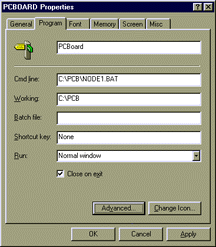


It is also recommended that you run PCBoard in a FULL SCREEN, not a window. The reason, windowed sessions take up to 64k more than a full screen session. And full screen sessions are faster because Win95 doesn't have to virtualize the textmode screen and convert it into a windows font.

The 'idle sensitivity' setting was found to be VERY important to the function of PCBoard under Windows 95. It was found that if this setting was not full to the left, the background node(s) would freeze! A great way to check priority is to window two sessions side by side and adjust the idle sensitivity. Watch the system clock, the updates will go faster or slower depending on the setting you choose.
PCBoard SettingsIn PCBsetup | Node configuration answer Y to the Running a Network / Multitasker System question.